Introduction
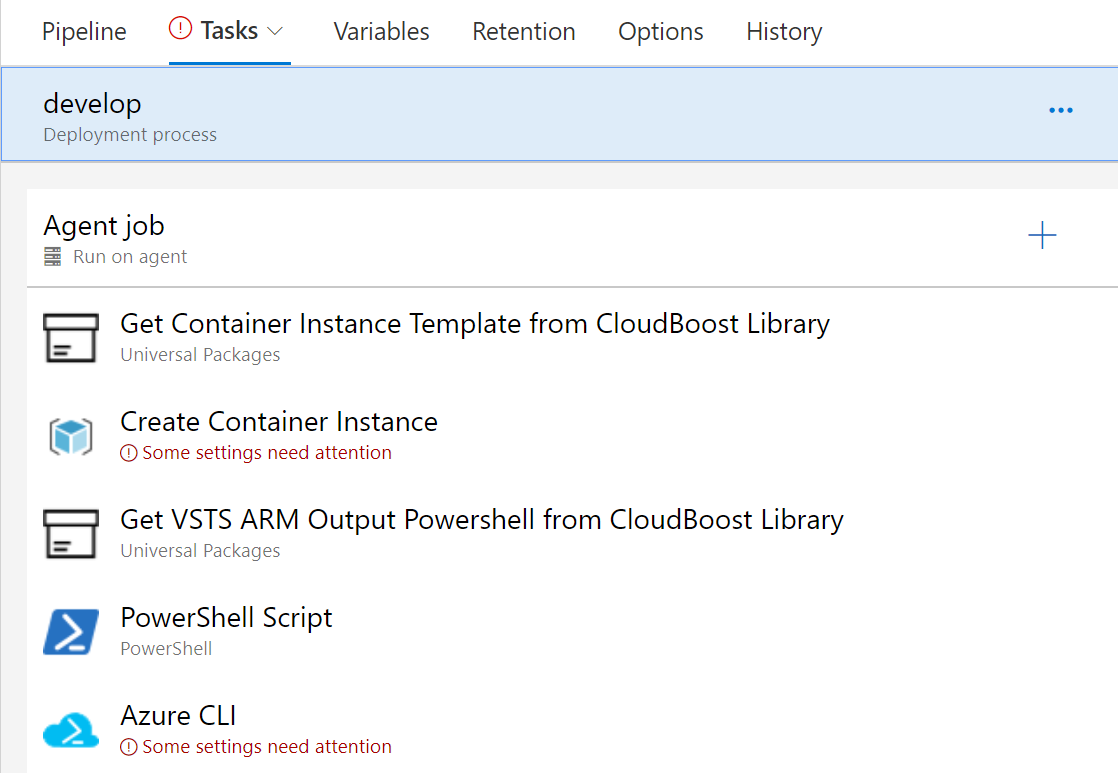
The Container instance release pipeline contains five steps (see image below). The first takes the ARM template from the CloudBoost Library Artifact store and the second provisions the Container Instance. By default the Container Instance is created with a System Identity, this identity can be used to grab secrets from an Azure KeyVault. This is what the three other steps are doing, they assign the Container Instance Principal Account as a Access Policy to the provided Azure KeyVault.
Create Pipeline
Information
This creates a release pipeline in the given Azure DevOps account with the below structure, including all necessary files from this CloudBoost library. The service principal account should be created separately in the Azure DevOps account. The variables can all be set in the variables tab and the service principal account can be created via Project Settings --> Service connections. Also don’t forget to set the release trigger, by default it is set to manual.
Pre-requisites
- Azure Subscription and a resource group conform the naming convention. A Container instance is always from the App, (See Azure Resource Organization).
- Principal Account for access by Azure DevOps to the Azure Resource Group.
- Azure Resource Group with an Azure KeyVault, a Key vault can be provisioned in a App or Core resource group.
- Azure Container Registry, no mandatory. When using a public repository these variables (after generating the pipeline )can be left blanc), when using a private registry the user name and password are required. An Azure Container registry is normally provisioned in a Team Azure Resource Group.
Pipeline