Back to Azure Resource templates index <–

This set of templates helps automating the provisioning of Azure API Management.
Template Locations
Online documentation
Template reference
Service description
Related Pipelines
| Resource | Description | Type |
|---|---|---|
| Azure API Management Products and subscriptions | Configure the Azure API Management products and subscriptions. | |
| Azure API Management release pipeline create the service | Provision an Azure API Management service. | |
| Azure API Management Users and Groups | Configure the Azure API Management users and groups. |
the whole folder with ARM templates is added in the APIM package in the universal package manager.
A special setup of the templates is required for Azure API Management. We are following fully the process described on azure-api-management-devops-resource-kit.
The CloudBoost team will follow this Git repo and update the templates when there is an important update. Notify the team via [SogetiGitHubAdmins@capgemini.onmicrosoft.com][mailto://SogetiGitHubAdmins@capgemini.onmicrosoft.com] for support or update requests.

Requirements
- Resource group must been created with a valid name and location.
ARM Templates and Input values
Multiple templates are used for the API Management service. The sequence is important.
Release pipelines are under construction, the first versions can be found here : https://cloudboost.visualstudio.com/demo/_release?view=all
service.template.json, takes care of deploying the core APIM service.
- tagBillingIdentifier
- publisherEmail
- publisherName
- sku
- skuCount
users.template.json, adds users to the created APIM service.
- firstName
- lastname
- …
groups.template.json
- groupname
groupsUsers.template.json
- groupname
product.template.json
In Azure API Management, a product contains one or more APIs as well as a usage quota and the terms of use. Once a product is published, developers can subscribe to the product and begin to use the product’s APIs.
- productName
- policyXmlLink (or policyRawXml)
- groupName
The PolicyXml contains the policy configuration of the product.
subscriptions.template.json
Subscriptions. This ARM template creates/modifies subscriptions for an existing API Management instance.
When you publish APIs through API Management, it’s easy and common to secure access to those APIs by using subscription keys. Developers who need to consume the published APIs must include a valid subscription key in HTTP requests when they make calls to those APIs. Otherwise, the calls are rejected immediately by the API Management gateway. They aren’t forwarded to the back-end services.
To get a subscription key for accessing APIs, a subscription is required. A subscription is essentially a named container for a pair of subscription keys. Developers who need to consume the published APIs can get subscriptions. And they don’t need approval from API publishers. API publishers can also create subscriptions directly for API consumers.
Refer: Subscriptions in Azure API Management for more details.
Additional information
Azure API management is a turnkey solution for publishing APIs to external and internal consumers. Quickly create consistent and modern API gateways for existing backend services hosted anywhere.
- Provide API documentation and an interactive console
- Throttle, rate limit and quota your APIs
- Monitor health of your APIs and quickly identify errors
- Bring modern formats like JSON and REST to existing APIs
- Connect to APIs hosted anywhere on the Internet or on-premises and publish globally
- Gain analytic insights on how your APIs are being used
- Manage your service via the Azure portal, REST API, PowerShell, or Git repository
Azure API Management Product Roadmap: https://trello.com/b/FAA147vS/azure-api-management-product-roadmap
General guidelines
- The goal is to keep the API Gateway as dumb as possible, no big and complex ‘business’ functionality in the policies.
- Authentication and authorization is controlled at API Gateway level, the API itself must be hardened for unrestricted access. This can be done via restricted access only by the API gateway or by adding authentication and authorization in the API too, AAD groups will minimize double administration.
- API’s are responsible for their own performance and caching. Throttling and rate limits can be set at API Gateway level for accessing users, but the API must be hardened for memory overload.
- The API will need to response with the proper HTTP numbers.
- The API will need to expose its methods via Swagger.
Security Settings
Azure API Management offers the following mechanisms to implement security:
- VNet integration. API Management Standard is not integrated with a VNET. Connection between API Management and API Apps is can be secured by certificates.
- Certificate based communication between Azure API Management and backend API.
- Basic Authentication. Not recommended for production.
- AAD Integration. Only for AAD secured API’s.
- Restrict IP Address in Azure API Management;
- Restrict IP address in .NET backend API.
By default, access to the APIs is only allowed through Azure API Management. This restriction will be set via certificate based communication.
VNet integration From a costs perspective, it is not recommended to use Azure App Service Environments (ASE) for deploying API App components. In order to benefit from the ASE security features the Premium pricing plan for API Management is needed. API’s which are not hosted on Azure can’t make use of this capability.
Certificate Authorization. To prevent accessing the APIs directly (from the internet), Certificate Authorization between Azure API Management and the APIs is implemented. APIs validate all incoming request for the presence of a valid, well-known security certificate. In case a missing or invalid certificate is found, the request is rejected (forbidden).
Within Azure API Management an official (well-known) certificate is imported. Azure API Management is configured to automatically send the certificate with each request to the APIs. Because of this, APIs will accept the request coming from Azure API Management. For implementation details: https://docs.microsoft.com/nl-nl/azure/api-management/api-management-howto-mutual-certificates
Secure API access with Azure Active Directory. Securing an API with AAD can be used when all the users are part of a connected known AAD. For detailed configuration see: https://docs.microsoft.com/nl-nl/azure/api-management/api-management-howto-protect-backend-with-aad This method should only be used when the API’s are all configured with AAD Authentication and the calling Applications can be registered in the same AAD.
Restrict IP address in Azure API Management. This can be implemented by using a policy. For more information see: https://msdn.microsoft.com/library/azure/034febe3-465f-4840-9fc6-c448ef520b0f#RestrictCallerIPs
Restrict IP Address in .NET backend API .NET based applications can restrict access on an IP Address level by using the ‘ipSecurity’ setting in the web.config file. (see” https://msdn.microsoft.com/en-us/library/ms691353(v=vs.90).aspx) For example:
  <security>
    <ipSecurity allowUnlisted="false">
      <clear/>
      <add ipAddress="127.0.0.1" allowed="true"/>
      <add ipAddress="21.97.217.24" allowed="true"/>
    </ipSecurity>
  </security>
The Virtual public IP Address of the Azure API Management instance can be found on the dashboard in the Azure Management portal.
Configuration API’s in API Management
Groups and Products
The organization of Groups and Products for API’s can be different depending on the needs. Many API’ will be added to an API Management instance, each API will probably be realized and delivered by a different team. To keep the overview for team it is recommended to keep a well-structured API Management environment.
To get an easy structure, where every team manages their own API, it is recommended to create a Product for each API, where the acceptance environment gets a separate Product.
This API Management Product is used to specify whether a subscription key is needed for the API and specifies which Groups have access to the Product (and API).
Each API that is hosted in API Management gets its own “Group” for both the acceptance and production environment. Each user (application) that needs access to the API is assigned to the Group.
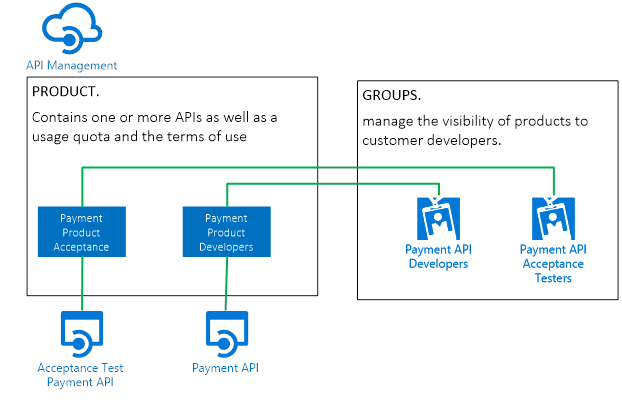
When there is a need for a sophisticated rate limit (and other policies) for multiple API’s combined. It is recommended to combine these in Products.
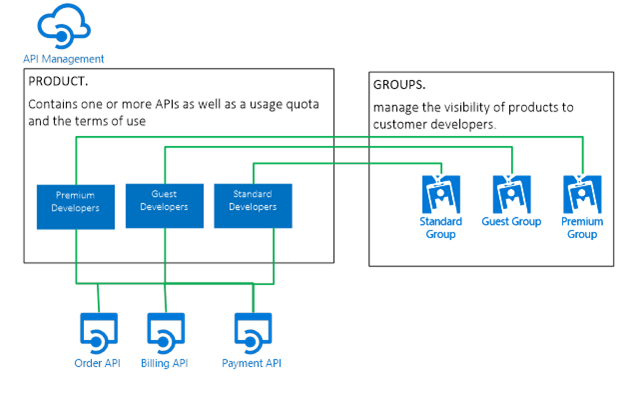
Note: Always remove the “Developer” Group from the Product. Each user in API Management is automatically added to the Developer Group. Omitting to remove the Developer Group makes the Product (and API attached) visible for ALL users (also the ones that have access to different APIs).
API Management configuration
The configuration of Azure API Managmenet can be separated in two categories, general for the API Management instance and specific for API’s.
API Management instance configuration is set once, while API will be configured (added and removed) constantly. Both configuration settings categories are set via the API Management ARM templates and REST API’s.
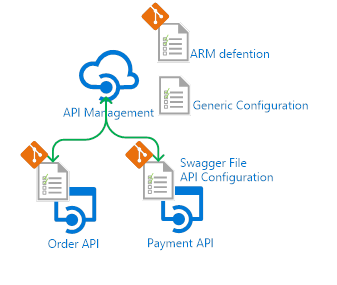
The generic API Management configuration is stored in the service, user, groups, products, subscription, security and diagnostic ARM Templates, the API specific configuration should be kept close to the repositories of the corresponding API projects, where the release (CD) updates the API Management instance.
To get the API specific ARM templates a small tool can be used from the azure-api-management-devops-resource-kit. Based on the Swagger defenition it generates the required ARM templates.