ADA is a custom AI solution that generates synthetic data that looks and feels like your real data. ADA unlocks analytics and software development by giving you full access to your data without compromising on customer trust, compliance and privacy & security. ADA is scalable, meaning large amounts of data can be generated from a relatively small dataset.
ADA Design
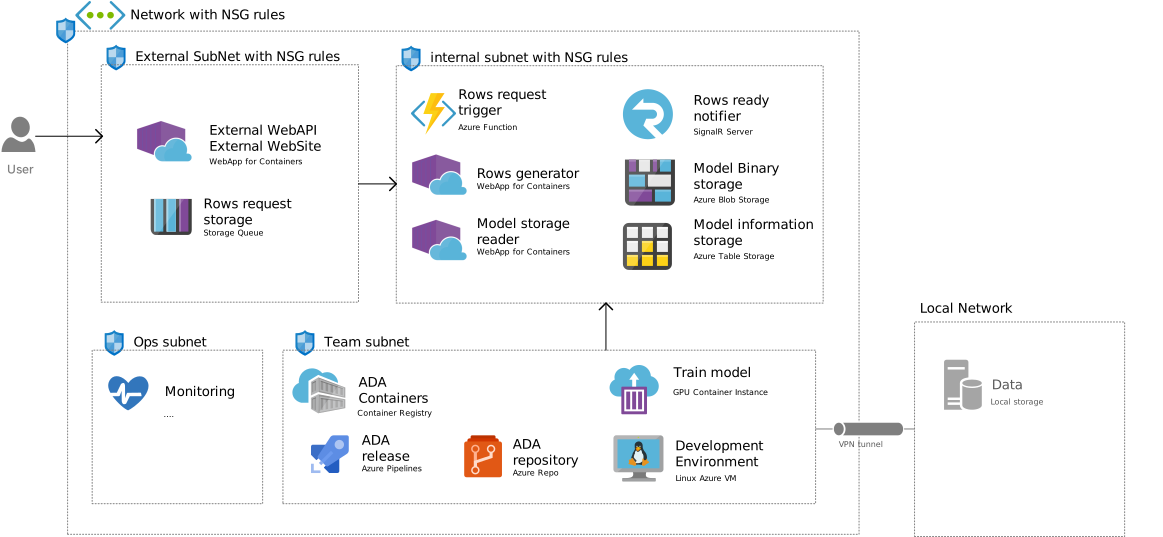
Cloud Architecture
External Subnet with NSG rules
This subnet is where our users can interact with ADA. In this subnet we have a Webapp and a Storage queue.
- External WebAPI. This is the front-end that users will utilize to interact with ace. It shows a list of the available models. The user can select a model, enter the number of rows that the model must generate and a submission call where the API sends a request to generate the rows.
- Rows request storage. This storage queue stores all the requests from the WebAPI to generate rows. In the case where multiple requests are submitted and when there is currently no resource available to process the request, the queue will hold the request in storage until a resource becomes available. Users will see in the front-end that their request is waiting for a resource.
Internal Subnet with NSG rules
This subnet is the inference subnet for trained ADA models. Only the WebAPI in the external Subnet can make read calls to this subnet. This subnet has all the components necessary to generate rows using one of the available models.
- Rows request trigger. Once a resource is available to process a request, the trigger will active the rows generator container.
- Rows generator. This container is a generic container that can load any pretrained keras model in the Model Binary using the Model storage reader.
- Model storage reader. This container reads in the models that are available in the Model Binary storage including the Model Information from the Model Information storage. It will return a model to the Rows generator container.
- Model Binary and Model Information storage. These components will hold the actual trained models and the metadata about the models so that the end users can select the correct model for their purpose. These models and the metadata are fed by the Team subnet. The Team subnet is the only subnet that can write to the internal subnet.
Team subnet
This subnet is where developers and containers are used to prepare models for later inference. It has a VPN to the local network of the organization.
- Development Environment. The subnet is only accessible using the Linux Azure VM. This is to increase security. From this development VM we can VPN to get the required data.
- Data. The data is in the Local Network and there will be no copy in disk storage of the data inside the ADA borders. The data is read into memory using the VPN link.
- VPN tunnel. We use VPN to create a secure link to the organisation’s databases containing the data that must be synthesized. This data flows to a GPU container instance fro training.
- Train model. The GPU instance uses ADA’s code to train a model for a specific dataset. Once all validation checks are met, the training stops, and a copy of the model is stored.
- ADA repository/ ADA release. This repo is used to maintain version controls of the models and the code. The release is used for CI/CD to write the trained models to the ADA container registry.
- ADA Containers. The registry keeps version-controlled models of ADA per dataset and feeds the internal subnet with new models once they become available
- The Team subnet is the only subnet that can write to the internal subnet. We implement rules to make sure of this.
Network Consideration for setting up the environment
In this scenario, the External WebAPI will host multiple APIs using Application Service Environment (ASE) and would consolidate these APIs internally using Azure API Management deployed in a Vnet. This External API Management instance would be exposed to the external users or consumers or in this case the Internal Subnet to allow for utilization of the full potential of the WebAPIs, this external exposure could be achieved using an Application Gateway forwarding request to the API Management service, which in-turn consumes the APIs deployed in the Application Service Environment.
The below components will be deployed using the Resource Manager Template
Vnet with the following configuration Name: ASE-Internal-Vnet Add Space: 10.0.0.0/16 Four Subnets:
- Subnet for Internal Subnet (Azure Application Gateway): 10.0.0.0/24
- API Subnet for External Subnet (API Management): 10.0.1.0/28
- Azure Service Environment (ASE): 10.0.2.0/24
- VM Subnet for Internal DevOps Hosted Agent: 10.0.3.0/24
Network Security Groups
The required entries in an NSG, for an Azure Service Environment to function, are to allow traffic:
Inbound
- from the IP service tag AppServiceManagement on ports 454,455
- from the load balancer on port 16001
Outbound
- to all IPs on port 123
- to all IPs on ports 80, 443
- to all IPs on port 12000
- to the ASE subnet on all ports
Virtual Network Service Endpoints
Virtual Network (VNet) service endpoints extend your virtual network private address space. The endpoints also extend the identity of your VNet to the Azure services over a direct connection. Endpoints allow you to secure your critical Azure service resources to only your virtual networks. Traffic from your VNet to the Azure service always remains on the Microsoft Azure backbone network. This feature is available and will be used to access the below Azure Services
- Azure Storage
- Azure DB (both SQL and Cosmos)
- Azure App Service
- Azure Key Vault
- Azure Container Registry
ADA Deployment
Some first ideas on deployment.
Infrastructure provisioning steps
- Create Azure Subscription
- Add Azure DevOps account, we use dev.azure.cloudboost/ada – not needed, but good to create scripts
- Create GIT folder structure (see proposed folder structure below)
- Create an AD user group that will be granted permission to manage storage accounts in KeyVault
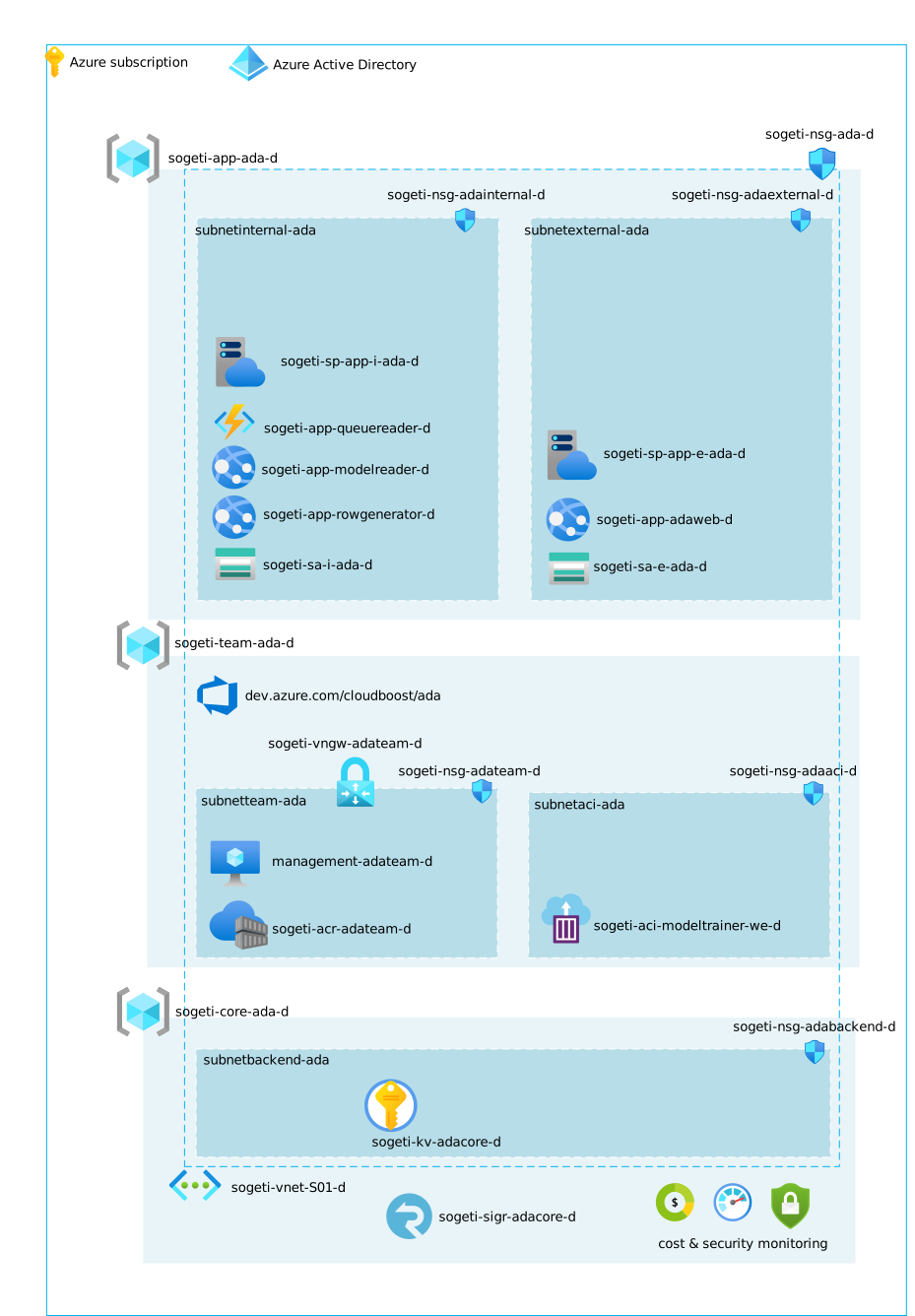
- Create resource groups, add Service Principal and Azure DevOps service connection (see script
./admin-scripts/bootstrap-ada-deployments)- This action requires elevated admin rights. Therefor it has to be executed from a script by an admin.
- Add resource group name sections (customer, project name etc to azure devops release)
- Add AD Service Principal per resource group (see below). All service principals will be contributor on their own resource group. Additionally, the core service principal will be granted the reader role on the app resource group.
- Add Service connections for AD Service Principal to Azure DevOps
Note: recreating the resource groups will ‘break’ the connected service, as this is scoped to the resource group. Deployments will fail, or you might be deploying using an other account than expected
- Setup network, subnets, nsg and vpn gateway (see pipeline
03 CreateNetwork)- set NSG restrictions (see Visio)
- gateway configuration (where is the data? should we create for a demo a separate network?)
- Provision Core resources: KeyVault and SignalR (see pipeline
04 CreateCoreResources)- This pipeline requires an ObjectId. This ObjectId should refer to a group (or user) who will be granted to manage storage accounts in the Key Vault, e.g. setting SAS token
- Provision App resources: storage accounts, web applications and application service plans (see pipeline
05 CreateAppResources) - Provision Team resources: VM and Container registry (see pipeline
06 Create TeamResources)- Container instance can only be provisioned when the container image is available
- Configure Core resources: adding web apps to KeyVault with permission to read secrets (see pipeline
0x ConfigureCoreResources)- Permissions are granted on objects. To find the objectId of the web apps, the service principal for the core resource group required reader role on the app resource group
- Assign KeyVault Storage Account Key Operator Service Role on storage accounts (see script
./admin-scripts/assign-keyvault-roles)- This action requires elevated admin rights. Therefor it has to be executed from a script by an admin.
- Key Vault Managed Storage accounts have the benefit that permissions to SAS tokens are managed by Key Vault and keys are automatically rotated.
- Clients have to be granted Key Vault permission to get secrets before retrieving the token (this is handled by ConfigureCoreResources)
- Key Vault does not automatically provide an SAS token. A template for the SAS token has to be added to KeyVault (requiring storge permission on KeyVAult). For more information ans samples see Manage storage account keys with Key Vault and the Azure CLI
Notes: to discuss with ADA team
- What type of VM, web apps and function should be provisioned
-
How to provision container instance without having the container image
- Provision Container instance + VM
- configure start stop VM (anyone knows the VM details and how to configure a linux gpu vm in a network?)
- configure container instance to network (I’m not sure if a container is immediately required otherwise we should move it later in the deployment sequence)
- Provision storage accounts + app service + function (see proposed pipelines later this one would also have a container deployment)
- add storage account secrets to
- add KeyVault policy for app services
Additional notes
- We are usng multi-stage pipelines. A stage can be DEV or TEST. The stages in a pipeline refer to an environment. Environments can (and should!) be used to set approvals and checks.
- So far, I wasn’t able to find how to automated the creation of environments
- Currently, the password for ACR is stored in a variable group, inspired by 6 Ways Passing Secrets to ARM Templates, see option 6. Another option to investigate using linked templates, see option 4.
- If TEAM resources will not be available in OTAP, just 1 environment, then add a Keyvault in TEAM to store the ACR password, such that all other environments (app-d, app-t, core-d etc.) can use the same KeyVault to retrieve the password
Folder structure and files
Related Azure Resources
| Resource | Description | Automation |
|---|---|---|
| SignalR Service | SignalR Service | ARM |
| Application Insights | his template creates an Application Insights object, but doesn't connect it with any resource yet.. | ARM |
| App Service Plan Linux | Azure App Service plan deployment creates an Azure App Service Plan using Linux Operating System. | ARM |
| Azure function | Azure functions is a solution for easily running small pieces of code, or "functions," in the cloud | ARM |
| Azure Container Instance | Azure Linux Container Instances basic deployment with public end point. | ARM |
| Azure Container Registry | Azure Container Registry, a private registry for hosting container images. Store Docker-formatted images for all types of container deployments. | ARM |
| KeyVault | Creates a key vault for the storage of secrets, keys and certificates | ARM |
| KeyVault update secret | Update or add a secret to an existing Azure KeyVault. Used during release when a resource is created which exposes a secret. | ARM |
| Network Security Group | A network security group (NSG) includes rules that allow or deny traffic to a virtual network subnet, network interface, or both. | ARM |
| Storage Account | Microsoft Azure Storage is a Microsoft-managed cloud service that provides storage that is highly available, secure, durable, scalable, and redundant. Azure Storage consists of Blob storage, File Storage, and Queue storage. | ARM |
| Web App Service for container | Azure Web App deployment in an existing Azure App Service Plan. | ARM |
| Web App Service | Azure Web App deployment in an existing Azure App Service Plan. | ARM |
| KeyVault | Creates a key vault for the storage of secrets, keys and certificates | Bicep |
Related Pipelines
| Resource | Description | Type |
|---|---|---|
| Assign KeyVault roles | Give KeyVault permissions on storage account (V2) using the current active subscription | |
| Powershell to deploy an Azure RM template | Validate, provision and rollback an Azure RM template deployment, with optional parameter file |
├── ADA
|   └── CoreResources
|   |   └── AzureDevOps scripts
|   |   └── Resource Groups and SPA scripts
|   |   └── Network scripts and templates
|   |   └── KeyVault templates
|   |   └── App Service Plan template
|   |   └── SignalR template
|   |   └── Container registry template
|   |   └── ... other
|   └── AppResources
|   |   └── Container instance template
|   |   └── VM template
|   |   └── function template
|   |   └── app service template
|   |   └── storage account template
|   └── Pipelines
|   |   └── Create Azure DevOps yml
|   |   └── Create Resource Groups and SPA yml
|   |   └── Create Network yml
|   |   └── Create App Service Plan + KeyVault + SignalR + Container registry yml
|   |   └── Create Container instance + VM yml
|   |   └── Create storage accounts + app service + function + 'container deployment' yml
|   |   └── Build modelreader project + container registery registration yml
|   |   └── Build rowgenerator project + container registery registration yml
|   |   └── Build queuereader project + container registery registration yml
|   |   └── Build adaweb project + container registery registration yml
|   └── modelreader project
|   └── rowgenerator project
|   └── queuereader project
|   └── adaweb project
readme.md
security.md
- Create Azure DevOps yml
- Create Resource Groups and SPA yml
- Create Network yml
- Create App Service Plan + KeyVault + SignalR + Container registry yml
- Create Container instance + VM yml
- Create storage accounts + app service + function + ‘container deployment’ yml
How to get it
Ask access to Sogeti GitHub ADA Repository by sending a mail to Clemens.Reijnen@Sogeti.com