Introduction
Sogeti Cloud Solutions require a specific setup to enable multiple deployments and maintanance. Sogeti Cloud Solution deployments require that they can be updated from a single location (CloudBoost library) and that deployments can control these updates.
Infrastructure provisioning steps
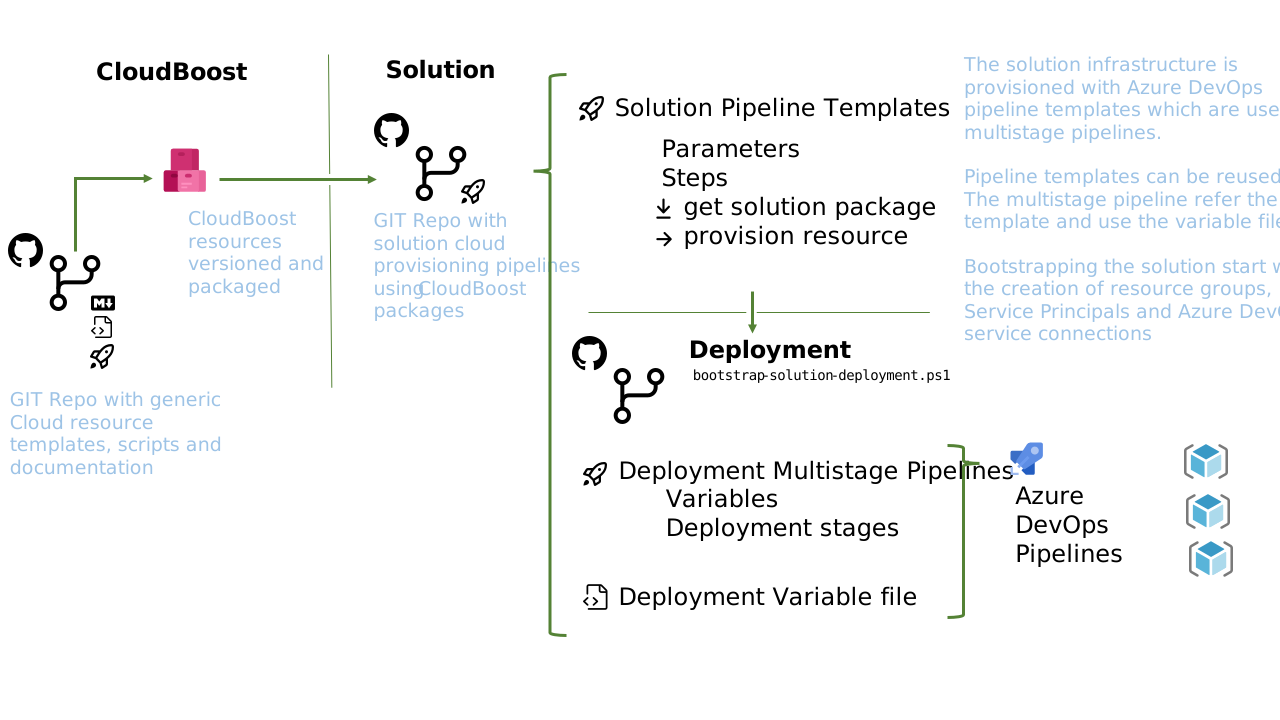
- Create Azure Subscription
- Add Azure DevOps account, we use dev.azure.cloudboost/ada – not needed, but good to create scripts
- Create GIT folder structure (see proposed folder structure below)
- Create an AD user group that will be granted permission to manage storage accounts in KeyVault
- Create resource groups, add Service Principal and Azure DevOps service connection (see script
./admin-scripts/bootstrap-ada-deployments)- This action requires elevated admin rights. Therefor it has to be executed from a script by an admin.
- Add resource group name sections (customer, project name etc to azure devops release)
- Add AD Service Principal per resource group (see below). All service principals will be contributor on their own resource group. Additionally, the core service principal will be granted the reader role on the app resource group.
- Add Service connections for AD Service Principal to Azure DevOps
Note: recreating the resource groups will ‘break’ the connected service, as this is scoped to the resource group. Deployments will fail, or you might be deploying using an other account than expected
- Setup network, subnets, nsg and vpn gateway (see pipeline
03 CreateNetwork)- set NSG restrictions (see Visio)
- gateway configuration (where is the data? should we create for a demo a separate network?)
- Provision Core resources: KeyVault and SignalR (see pipeline
04 CreateCoreResources)- This pipeline requires an ObjectId. This ObjectId should refer to a group (or user) who will be granted to manage storage accounts in the Key Vault, e.g. setting SAS token
- Provision App resources: storage accounts, web applications and application service plans (see pipeline
05 CreateAppResources) - Provision Team resources: VM and Container registry (see pipeline
06 Create TeamResources)- Container instance can only be provisioned when the container image is available
- Configure Core resources: adding web apps to KeyVault with permission to read secrets (see pipeline
0x ConfigureCoreResources)- Permissions are granted on objects. To find the objectId of the web apps, the service principal for the core resource group required reader role on the app resource group
- Assign KeyVault Storage Account Key Operator Service Role on storage accounts (see script
./admin-scripts/assign-keyvault-roles)- This action requires elevated admin rights. Therefor it has to be executed from a script by an admin.
- Key Vault Managed Storage accounts have the benefit that permissions to SAS tokens are managed by Key Vault and keys are automatically rotated.
- Clients have to be granted Key Vault permission to get secrets before retrieving the token (this is handled by ConfigureCoreResources)
- Key Vault does not automatically provide an SAS token. A template for the SAS token has to be added to KeyVault (requiring storge permission on KeyVAult). For more information ans samples see Manage storage account keys with Key Vault and the Azure CLI
Notes: to discuss with ADA team
- What type of VM, web apps and function should be provisioned
-
How to provision container instance without having the container image
- Provision Container instance + VM
- configure start stop VM (anyone knows the VM details and how to configure a linux gpu vm in a network?)
- configure container instance to network (I’m not sure if a container is immediately required otherwise we should move it later in the deployment sequence)
- Provision storage accounts + app service + function (see proposed pipelines later this one would also have a container deployment)
- add storage account secrets to
- add KeyVault policy for app services
Additional notes
- We are usng multi-stage pipelines. A stage can be DEV or TEST. The stages in a pipeline refer to an environment. Environments can (and should!) be used to set approvals and checks.
- So far, I wasn’t able to find how to automated the creation of environments
- Currently, the password for ACR is stored in a variable group, inspired by 6 Ways Passing Secrets to ARM Templates, see option 6. Another option to investigate using linked templates, see option 4.
- If TEAM resources will not be available in OTAP, just 1 environment, then add a Keyvault in TEAM to store the ACR password, such that all other environments (app-d, app-t, core-d etc.) can use the same KeyVault to retrieve the password